10
Ping
I recall a frantic evening in 2021, hosting an online game night with friends across the globe. Midway through, my connection stuttered, turning epic wins into laggy losses. Cursing my router, I recalled "ping" from tech forums and fired up an online tester.
Ping: Testing the Pulse of Your Internet Connection
I recall a frantic evening in 2021, hosting an online game night with friends across the globe. Midway through, my connection stuttered, turning epic wins into laggy losses. Cursing my router, I recalled "ping" from tech forums and fired up an online tester. The results? A whopping 200ms delay to Europe – culprit found, fix applied. That lightbulb moment turned frustration into fascination with this network diagnostic gem. If you've battled buffering videos or dropped calls, ping tools are your heartbeat monitor for the web. Join me as we explore what ping is, how it ticks, and the top testers keeping connections alive in 2025.
What Is Ping?
Ping is a simple network utility that sends echo packets to a target (like a website or server) and measures the round-trip time for responses, gauging latency in milliseconds. Named after sonar pings, it checks if a host is reachable and how "healthy" the path is. Online ping tools make this accessible via web interfaces, no command line needed, revealing bottlenecks in your internet journey. It's the first stop for diagnosing slow loads or unstable links.
Why Is Ping Testing Essential?
In our always-on era, ping quantifies the "feel" of your connection – low ping means snappy responses, high spells delays. Gamers crave under 50ms for fluid play; businesses need it for VoIP clarity. With 5G and fiber booming in 2025, ping tools benchmark upgrades, spotting ISP throttling or router woes. It's satisfying, like timing a runner's sprint, to see improvements post-tweak.
For Gamers and Streamers
Gamers use ping to select low-latency servers, avoiding rubber-banding frustrations. Streamers check to Twitch or YouTube for buffer-free uploads. I've bonded over shared "ping hell" stories – it's relatable tech talk that builds community.
For Businesses and Remote Work
Enterprises ping critical servers for uptime, ensuring cloud apps run smooth. Remote teams test VoIP to colleagues, preventing meeting mishaps. In hybrid 2025 work, it's a productivity savior, turning potential chaos into calm.
How Does Ping Work?
Ping uses ICMP (Internet Control Message Protocol) to dispatch small data packets, timing their echo back while noting packet loss. Tools visualize this with graphs, showing average, min/max latency. Online versions leverage WebRTC for browser-based pings, bypassing firewalls. It's like tossing a ball and clocking the catch – straightforward yet revealing path issues.
Understanding Latency and Packet Loss
Latency is the delay (ms); packet loss is dropped packets, causing stutters. High loss? Congestion or bad wiring. Tools break it down, helping pinpoint fixes like QoS settings. Once, spotting 10% loss led me to swap cables – magic!
The Evolution of Ping Tools
Born in 1983 ARPANET days, ping was CLI-only; now, 2025 web tools add multi-location testing and alerts. AI predicts trends from data, and IPv6 support is standard. From basic checks to predictive analytics, they've mirrored internet growth.
Common Myths About Ping Testing
Myth: Low ping guarantees speed – nope, bandwidth matters too. Another: Ping only for games – it's universal for any IP-based service. And "pinging floods" as attacks? Ethical tools limit packets. Clearing these myths makes testing approachable for all.
How to Ping Manually
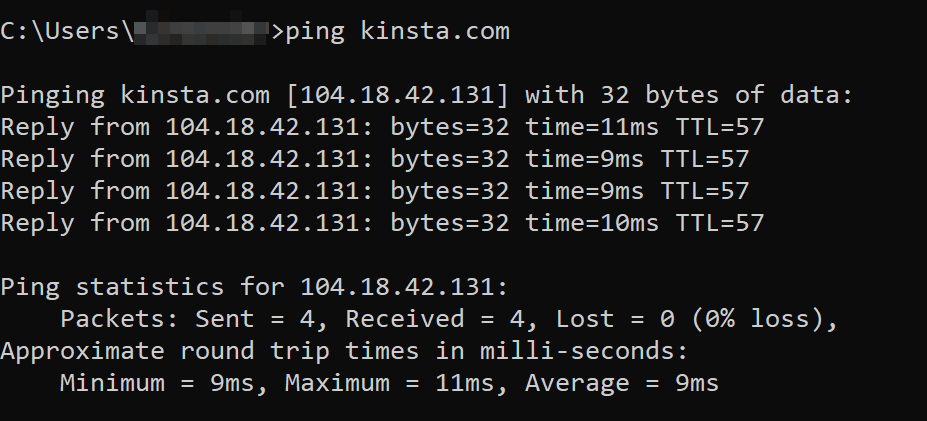
Command line: Open terminal, type "ping google.com" (stop with Ctrl+C). It streams results endlessly. For precision, add count like "ping -c 4 example.com." It's raw but effective; I use it for quick home tests.
In Command Prompt (Windows)
Type "ping www.example.com" in CMD – watch times roll in. Options like -t for continuous. Simple, no frills, perfect for basics.
In Terminal (Mac/Linux)
"ping -c 10 google.com" limits to 10 pings. Stats summarize at end. Unix power in a line – feels pro.
Where to Get Online Ping Tools
Free ping testers abound on sites like PingPlotter free tier or KeyCDN's tool; search "online ping test" for options. Browser extensions or apps like PingTool add portability. Avoid paywalls for basics – plenty of gems out there.
Best Ping Tools in 2025
2025's ping tools evolve with real-time graphs, global nodes, and integration with monitoring suites. They handle IPv6 and alert on spikes, crucial for hybrid networks. From freebies to enterprise, they ensure connections pulse strong.
Comparison table:
Tool NameKey FeaturesFree Tier?Best ForDrawbacksPingPlotter | Visual traces, packet loss graphs | Yes (basic) | Troubleshooting | Pro features paid
KeyCDN Ping | Multi-location, parallel tests | Yes | Global latency checks | Limited history
GlobalPing.io | Location-specific pings, UDP/WebRTC | Yes | International users | Ads in free
Better Stack Ping | Alerts, historical data | Limited | Monitoring | Setup required
WTFast Ping Tester | Gamer-focused, route optimization | Yes | Gaming | VPN tie-in pushes
Top for diverse needs.
PingPlotter: Visual Diagnostic King
Its timeline graphs show latency trends over hours, pinpointing intermittent issues. Free version suffices for most; I love the color-coded paths – like a network rainbow.
KeyCDN Ping: Speed Demon
Pings from 20+ global spots simultaneously, ideal for CDN tweaks. Instant results, no login. Handy for my travels, comparing hotel Wi-Fi horrors.
GlobalPing.io: Worldwide Reach
Select nodes in 50 countries for accurate regional tests. WebRTC makes it seamless. The irony? Pinging from "US" while abroad feels sneaky-fun.
Pros and Cons of Ping Tools
Ping tools illuminate connection health, easy for novices yet deep for pros. They prevent downtime with proactive insights. Cons: Firewalls block some; results vary by time. Overall, invaluable for modern life.
- Pros:
- Instant latency visibility for fixes.
- Free multi-tool integrations.
- Helps optimize for work/play.
- Educational on network basics.
- Cons:
- ICMP blocks limit accuracy.
- Peak hours skew results.
- Overkill for stable connections.
- Privacy if tools log data.
Personal Story: Ping's Role in My Game Night Rescue
That 2021 fiasco? Pinging revealed my ISP's international routing suck. Switched DNS, re-pinged – down to 80ms! Friends cheered; I felt like a hero. It's a reminder: small tools fix big problems, with a side of laughs.
Advanced Tips for Ping Mastery
Use traceroute (ping's cousin) for hop-by-hop analysis; scripts automate via Python's subprocess. Set thresholds for alerts in tools like Better Stack. Humor: Ping your router first – blame the messenger sometimes.
People Also Ask: Ping FAQs from Searches
- What is a good ping time? Under 50ms for gaming; 100ms+ feels laggy for browsing.
- How to lower ping? Wired connections, close apps, or VPNs for better routes.
- Does ping affect download speed? Indirectly; high latency slows interactive tasks, not pure bandwidth.
- Can I ping from mobile? Yes, apps like Network Analyzer; web tools work too.
- What's packet loss in ping? Dropped data causing glitches; under 1% is ideal.
FAQ
Best free ping tool 2025?
KeyCDN for its global, no-fuss testing – quick and comprehensive.
How accurate is online ping?
95%+ if using multiple nodes; matches CLI for most.
Why high ping on Wi-Fi?
Interference or distance; switch to Ethernet for relief.
Ping vs. traceroute?
Ping tests reachability; traceroute maps the path.
Safe to ping websites?
Yes, ethical tools send few packets; no harm.
Ping isn't just tech jargon – it's your connection's vital sign. Test away, and watch your web world smooth out.
Contact
Missing something?
Feel free to request missing tools or give some feedback using our contact form.
Contact Us